When working with LLMs, the prompt is only part of the problem. The harder part is deciding which context should travel with the request: source files, command output, constraints, previous decisions, and the exact shape of the failure.
Most writing about LLMs asks how they make our work more efficient. The more interesting question here is narrower: how do we work more efficiently with the models themselves?
In my work, that often means leveraging multiple tools, each with a focused role, rather than treating the LLM as a single chat window that has to hold everything at once.
ctx fits into that gap. I want it to act as a small context layer between a project and an LLM, so I can stop rebuilding the same explanation by hand and send targeted, repeatable bundles instead.
What is ctx?
Here, ctx is a local CLI for working with agent history. It can discover and index previous sessions, list sources, search indexed history, show transcripts or individual events, locate metadata, expose read-only tools over MCP, and run read-only SQL against its local index.
That makes it useful as a memory and inspection layer for LLM work. Instead of relying on whatever a given chat client remembers, I can query what actually happened: which sessions ran, what context was captured, where it came from, and which pieces are worth reusing.
Why this matters
In day-to-day development, most LLM mistakes I see come from missing or stale context:
- an old assumption about how the project is structured
- a missing config file that changes the build path
- generated files mixed in with source files
- logs copied without the command that produced them
- a request that describes intent but omits the current state of the repo
This is especially visible in larger repositories, where “look at the code” is too broad and “here is one file” is too narrow. The fix is not more context but the right context: explicit rather than implied, small enough to inspect, grounded in current files and command output, and stripped of unrelated project noise, in a form that is easy to review before it reaches the model.
Interfaces such as Magentic-UI show how multi-agent tools can make human-agent collaboration easier to manage, but even the best interface does not remove the need for context you can inspect. What I want is the ability to query my own history of prompts, sessions, sources, and captured context, and to assemble it deliberately.
What I want from ctx
For LLM work, a useful ctx workflow should make it easy to collect:
- the files that define the behavior being changed
- nearby tests or examples
- project instructions and conventions
- current git state
- relevant command output
- a short human-written task note
It should also make omissions obvious. If I am asking why a payment webhook retries forever, I want the bundle to include the handler, queue configuration, idempotency checks, recent logs, and the failing test or trace. If I am asking for a Swift refactor, I want the relevant views, models, tests, and build output.
The search mechanisms exposed by most CLI or chat clients are useful for lookup, but they are not ideal for more demanding questions. Complex expressions, date ranges, source types, status flags, and combined filters are usually better handled by querying the underlying data directly.
Complex CLI searches
The ctx search command supports text queries, repeated terms, provider filters, workspace filters, time windows, event types, touched-file metadata, subagent inclusion, session drill-down, and JSON output. For example, while working on a hobby app, I wanted to find sessions that touched Defaults.swift and mentioned SwiftUI’s @AppStorage property wrapper. Full-text search tokenises the @ away, so the search term is just the bare word:
| |
This is useful, but it is still a search interface with flags. SQL is the better tool when I want arbitrary predicates: sessions from today, only a specific provider, one workspace prefix, a selected source type, non-stale catalog rows, and a custom sort order in the same question.
Direct SQL access
One practical advantage of ctx is that it exposes the underlying SQLite database directly. The location is visible from ctx status, so there is no hidden store to hunt for. I abbreviate my home directory to ~ below; the command itself prints absolute paths.
| |
| |
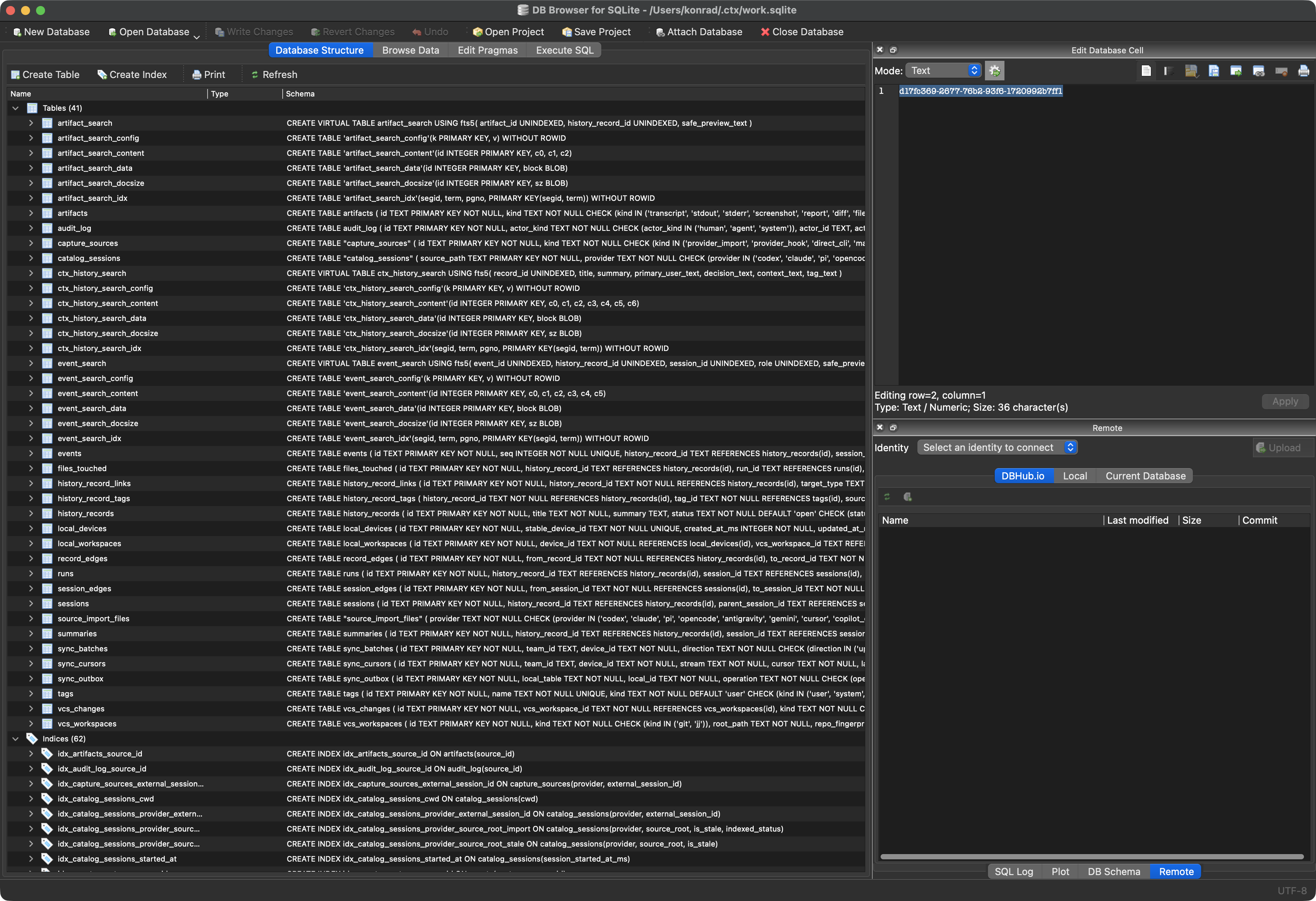
Because the store is ordinary SQLite, it also lends itself to careful inspection with common SQLite tools. I do not have to treat the ctx CLI as the only view into the data: DB Browser for SQLite can open the same work.sqlite file and show tables, indexes, FTS virtual tables, and raw rows directly.
The simplest way in is to get your bearings. A plain ctx sql query lists the tables and views, so I can see the shape of the store before writing anything more involved:
| |
| |
For one-off read-only commands like that, ctx sql is the safe default. Once I want to explore — join tables, tune a query, and reshape the result — litecli is more comfortable, and it opens the same file directly:
| |
This is not limited to schema browsing. Once inside litecli, the search tables are available too, so I can run full-text queries and join them back to event metadata. For example, to rank matching events for a phrase:
| |
For a statement-scoped view that is not stored in the database, I can use a CTE rather than CREATE VIEW. This example selects yesterday’s user queries, treats the provider in payload_json as the tool name, and groups the results by tool:
| |
That is where litecli becomes more than a database browser. It gives me an interactive scratchpad for the same search index: autocomplete tables, tune the MATCH expression, add joins, add date filters, and reshape the result until it is the right evidence for the next prompt.
Sharing context
ctx also helps when I move work between LLMs. Because the index records sessions, touched files, and event previews, I can ask another client to retrieve the narrow slice I need instead of pasting a long transcript. Staying with the same example, I could ask Claude to search the history — even though those sessions were originally run under a different tool:
Use
ctxto find sessions that discussed application defaults, especially sessions that touchedDefaults.swiftor mentioned SwiftUI’s@AppStorageproperty wrapper.
The model can then use ctx to run targeted searches and return a compact summary:
Sessions that focused on application defaults
<session-id>(codex) — strongest matchThis session discussed the defaults layer, the reset path, and changes related to
@AppStorage.…
The local CLI also exposes read-only tools over MCP through ctx mcp serve. That is the integration point I want when another assistant should search or inspect history without receiving write access.
Conclusion
The value of ctx is not that it replaces judgment about what context belongs in a prompt. Its value is that it makes that judgment easier to apply: search first, inspect the underlying SQLite data when the flags are not enough, and pass the next model a small, grounded set of evidence instead of a vague summary or a pasted transcript.